Closed-loop referral software
Connect household needs to services—and follow the referral through completion.
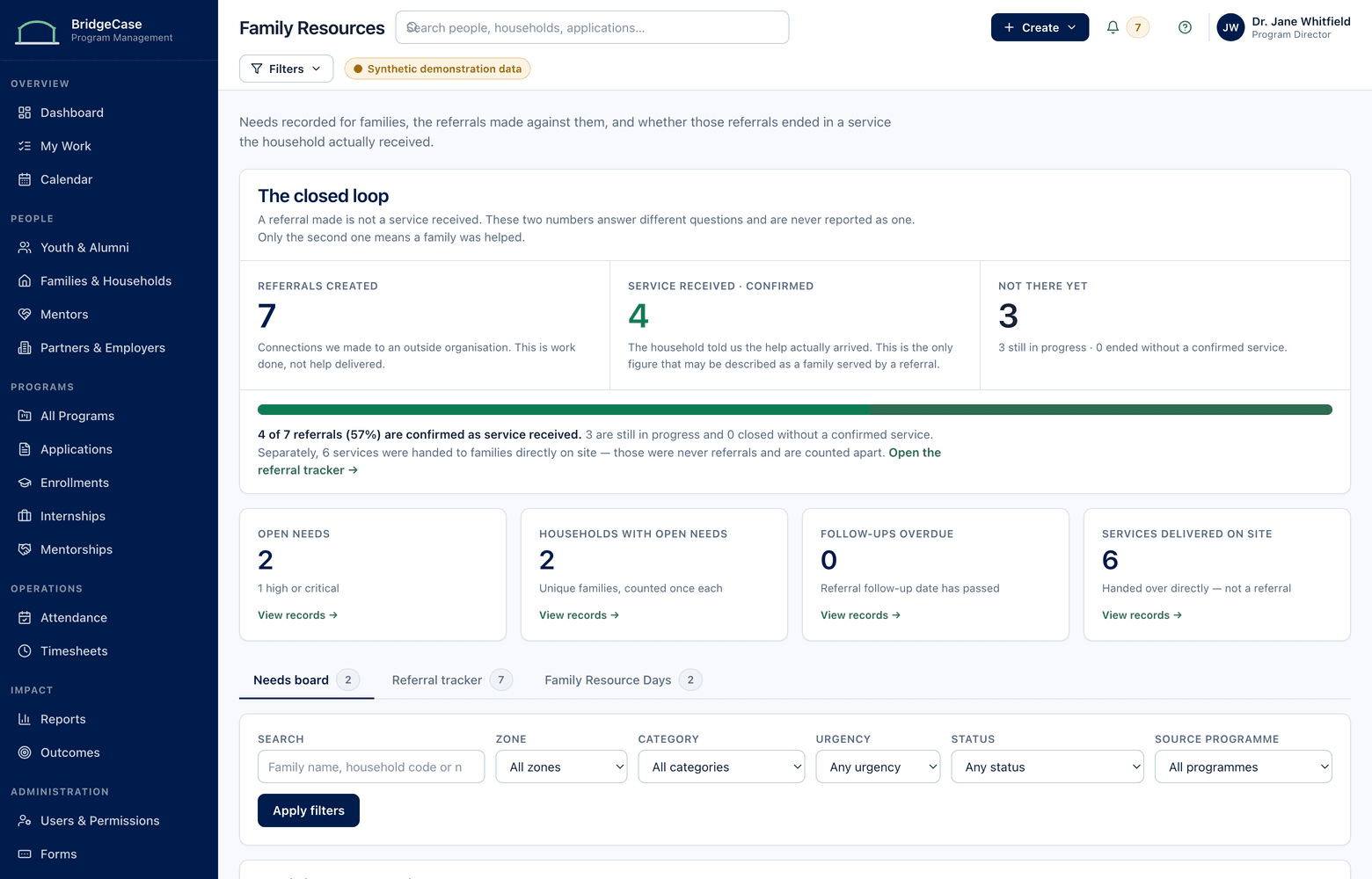
Handing a family a resource list is not the same as knowing they received help. BridgeCase records the need on the household record, sends the referral to a partner service, and tracks every stage — contact, appointment, service received — until the loop is actually closed.
The problem
A referral that nobody follows is just a suggestion.
In most organizations, a referral is a phone number on a flyer or a name scribbled during a conversation. Nothing records whether the family called, whether the partner answered, or whether the service was ever delivered. Follow-up depends entirely on a staff member remembering to ask — and caseloads make sure that doesn't happen consistently.
Needs also surface in the middle of other work: an intake interview, a mentoring check-in, a conversation at program pickup. When the referral tool is separate from the program system, that moment gets lost. The need never lands on the household record, program staff never learn it existed, and three months later a different staff member starts the same conversation from zero.
The result is a gap no spreadsheet can show you: the distance between referrals made and services received. That gap is where families fall through — and where your organization has no data to explain why.
The workflow
Need Identified → Referred → Contact Attempted → Appointment Scheduled → Service Received → Closed
Six stages, tracked as statuses on one referral record — so no referral quietly disappears between 'we told them about it' and 'they got the help.'
- 1
Identify the need
A structured household needs assessment at intake — or a single need logged mid-conversation — lands on the household record, categorized and dated, visible to the roles that should act on it.
- 2
Refer from the directory
Staff choose a partner service from your organization's resource directory. The referral record carries the need, the service, the consent noted, and who is responsible for follow-up.
- 3
Track contact and scheduling
Contact attempts and scheduled appointments are recorded as statuses. Referrals with no movement surface in a follow-up queue instead of aging silently in someone's memory.
- 4
Confirm and close
The loop closes when the record says the service was received — or documents that it wasn't, and why. Unresolved needs stay open and visible, not filed and forgotten.
Capabilities
What the family resources module covers.
Household needs assessment
Configurable assessments capture needs by category on the household record, so a need identified in one program is visible wherever it matters.
Partner resource directory
Your curated directory of partner organizations and services — eligibility notes, capacity, contacts, and referral instructions maintained in one place.
Referral records with stages
Every referral moves through named statuses from identified to closed, with dates, ownership, and notes at each transition.
Follow-up queues
Stalled referrals — no contact attempted, appointment missed, no confirmation — appear in a working queue so follow-up is a routine, not a memory test.
Partner follow-through visibility
See response times, acceptance, and completion by partner organization — the evidence you need for honest partnership conversations.
Need-level privacy controls
Household needs are restricted to roles with a reason to see them. Program staff can know context exists without reading details they don't need.
Who it helps
Value for every role that touches a referral.
- Family support staff
- One queue showing every open referral, its current stage, and what happens next — instead of a stack of sticky notes and good intentions.
- Program staff
- Enough household context to work well with a young person — a housing referral in progress, a food need resolved — presented as facts, not files to dig through.
- Directors and partnership leads
- Referral volume, completion rates, and partner responsiveness by organization — the data that turns an MOU into a working relationship.
- Data & grants staff
- Defensible counts of needs identified, referrals made, and services confirmed received — pulled from the records where the work happened.
Reporting
Report on completion, not just activity.
Most referral reporting counts what was handed out. Because BridgeCase tracks every stage, you can report on what was actually received — and where the loop breaks.
- Referral completion rates: share of referrals reaching 'service received,' by program and period
- Where referrals stall: volume at each stage from identified through closed
- Time from need identified to service received, by need category
- Partner follow-through: response time, acceptance, and completion by organization
- Unmet need: identified needs with no matching partner service — your case for new partnerships
Household needs deserve tighter handling than program rosters.
- Needs assessments visible only to roles your organization authorizes
- Referral detail can be restricted while completion status stays reportable
- No sensitive-category data is required to run a referral to completion
- Every access to a restricted needs record is logged in audit history
Frequently asked questions
What does "closed-loop" actually mean here?
It means the referral record isn't finished when the referral is made — it's finished when you know the result. Each referral moves through explicit stages (identified, referred, contact attempted, appointment scheduled, service received, closed), and it stays open and visible in follow-up queues until someone records the outcome. The loop closes on confirmation, not on hope.
Our partner organizations don't use BridgeCase. Can we still close the loop?
Yes. Partners don't need system access for the loop to work. Your staff update referral stages based on follow-up with the family or the partner — a phone call, an email, a confirmation. Where a partner is willing to participate directly, they can be given a narrow role that shows only the referrals sent to them, nothing else.
How is the privacy of household needs protected?
Needs assessments are restricted records. Your organization decides which roles can view, add, or update them, and every access is logged. Program staff can be shown high-level context — that a referral is in progress, or that a need was resolved — without seeing assessment detail. Mentors and partner roles never see the household needs record at all.
Can we report referral completion rates to funders and city partners?
Yes, and that's the point of tracking stages. Because every referral carries its full status history, you can report the share that reached 'service received,' where the rest stalled, and how long completion took — by program, need category, or partner organization. Those numbers come from the working records, not a year-end reconstruction.
Who maintains the resource directory?
Your organization does — it's your curated list of partners, not a scraped public database. Designated staff add services, eligibility notes, and contacts, and retire listings that go stale. Because referral outcomes are tracked against each listing, the directory tells you which entries actually lead to services received and which need a phone call.
See what one connected system could look like for your organization.
We will tailor the conversation to your programs, users, reporting needs, and current tools.
No youth or family data is required to request a demo.