Secure case management for youth programs
Protect sensitive information without blocking the people doing the work.
Youth and family records carry real weight — home situations, referrals, notes written in confidence. BridgeCase is built on least privilege: every role sees exactly what its job requires, every sensitive action lands in audit history, and your organization keeps ownership of its data — in terms your IT and procurement reviewers can verify for themselves.
The problem
Most youth-serving organizations run one of two failure modes.
The first is security by spreadsheet: a shared login, case notes forwarded over email, exports sitting in inboxes and download folders. There is no access model because there is no system — anyone with the file has everything in it, forever, invisibly. The second is the over-locked system: permissions so rigid that staff route around it, and the sensitive data ends up in the spreadsheet anyway.
Both failures come from treating access control as something bolted on after the case management design is done. For nonprofits, that risk is reputational and ethical. For municipal and public-agency programs, it's sharper: "who saw this record, and when" is a question you may be formally required to answer. A permission model that mirrors real job functions — and an audit history that answers that question in minutes — has to be part of the platform's architecture, not a setting someone remembered to turn on.
The workflow
Define Roles → Restrict What's Sensitive → Work with Accountability → Report Without Exposing
Governance that follows the shape of the work, so staff never have to choose between doing their job and doing it safely.
- 1
Define roles
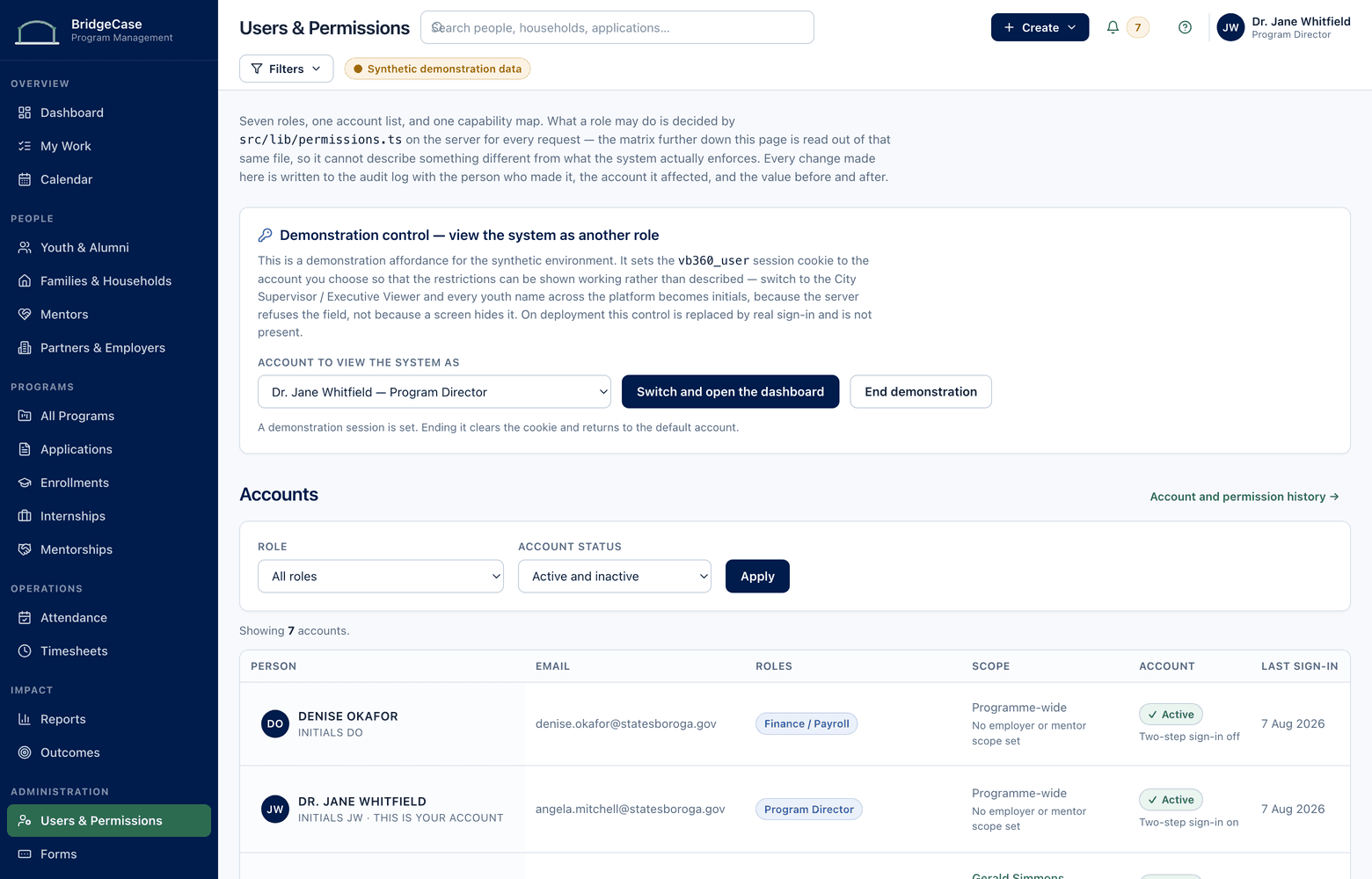
Roles map to real job functions and grant access per program, record type, and field — a workforce coordinator doesn't inherit family-services notes just because both live in one system.
- 2
Restrict what's sensitive
Note types and document categories carry sensitivity levels. Restricted content is limited to named roles, and staff see who will be able to read a note before they save it.
- 3
Work with accountability
Daily work proceeds at full speed while the system keeps the record: changes, access to restricted records, and exports are logged automatically with who, what, and when.
- 4
Report without exposing
Leadership and funders get de-identified aggregates. Row-level exports are a deliberate permission, granted to specific roles and logged every time they're used.
Capabilities
The controls, in plain terms.
Role-based access
Least privilege by default: roles scoped to programs, record types, and individual fields, designed around job functions rather than IT convenience.
Restricted notes & documents
Sensitivity levels on note types and document categories keep confidential content limited to designated roles — including out of search results and reports for everyone else.
Audit history
Timestamped entries for record changes, access to restricted content, and exports — filterable by record, person, and date range when someone has to answer for a file.
Export controls
Exporting row-level data is a permission, not a default. Grants are explicit per role, and every export is logged with who ran it, what it contained, and when.
Consent tracking
Consent recorded per participant and household with scope, form version, dates, and expirations — so staff see consent status before information moves anywhere.
Data-quality controls
Required fields, validation at entry, and duplicate flags — because a wrong or duplicated record is a governance failure too, not just a reporting nuisance.
Who it helps
Confidence for every seat at the table.
- Executive directors & leadership
- Answer board and funder questions from de-identified dashboards — without opening a single case file or asking staff to redact one.
- Program supervisors
- Control which note types are restricted, review audit history for their programs, and see consent gaps before they become incidents.
- Case managers & frontline staff
- See exactly the caseload the role covers and write candid notes knowing precisely who can read them — no second-guessing, no shadow spreadsheets.
- IT, security & procurement reviewers
- A documented permission model, audit trails, export controls, and data-ownership terms you can evaluate directly — with security documentation provided during review.
Reporting
Executive insight without case-file exposure.
Reporting is de-identified by design: leadership sees enrollment, outcomes, and trends in aggregate, while restricted note content stays where it belongs. And because access itself is recorded, governance is something you can report on — not just assert.
- De-identified outcome and enrollment dashboards for boards and executives
- Aggregate program counts computed without exposing restricted note content
- Audit reports showing who accessed, changed, or exported a record — and when
- Access reviews listing exactly which roles can see which record types and fields
- Consent coverage by program: current, missing, and expiring consent at a glance
Governance you can put in front of procurement.
- Every role is scoped to the programs, record types, and fields its job requires
- Restricted notes and documents are visible only to explicitly granted roles
- Changes, restricted-record access, and exports are written to audit history
- Row-level export is a deliberate permission — granted per role, logged every time
- Your organization owns its data, with full structured export available at any time
- Security program documentation is shared with your reviewers during evaluation
Frequently asked questions
Who can see case notes in BridgeCase?
Only the roles your organization explicitly grants. Note types carry sensitivity levels, and restricted notes are limited to designated roles — broad administrative access does not automatically include them. Staff writing a note see who will be able to read it before saving, so there's never a surprise about where candid words travel.
How does audit history work?
The system automatically records changes to records, access to restricted content, and every export — each entry timestamped with who acted and what was touched. Supervisors and administrators can filter the history by record, person, or date range, so when an oversight body or a family asks "who saw this record," the answer takes minutes, not an investigation.
What happens to our data if we end the contract?
It leaves with you, because it was always yours. Your organization can run a full structured export — records, documents, and audit history — at any point during the contract, and offboarding follows a documented process: complete export in standard formats, then deletion from production systems on the agreed timeline, confirmed in writing. Your data is never held as leverage.
How is consent tracked?
Consent is recorded per participant and household with its scope — program participation, information sharing, photo and media use — along with the form version signed, dates, and expirations. Staff see current consent status directly on the record before information moves, and reports surface missing or expiring consent by program so gaps are closed proactively rather than discovered later.
Which compliance certifications does BridgeCase hold?
We don't make certification claims on a marketing page, because a badge on a website isn't evidence — documentation is. During evaluation, your IT and security reviewers receive our current security program documentation, and we complete your security questionnaires directly. Certification status is something to verify with us in that process, where you can examine it properly, rather than take on faith from a webpage.
See what one connected system could look like for your organization.
We will tailor the conversation to your programs, users, reporting needs, and current tools.
No youth or family data is required to request a demo.