Nonprofit program management software
Move participants from interest to enrollment without losing the history.
BridgeCase runs the full program cycle — configurable applications, interviews, selection, enrollment, attendance, and follow-through — with every step written to the participant's permanent record. A returning family never starts from a blank form, and next year's cohort starts with this year's context.
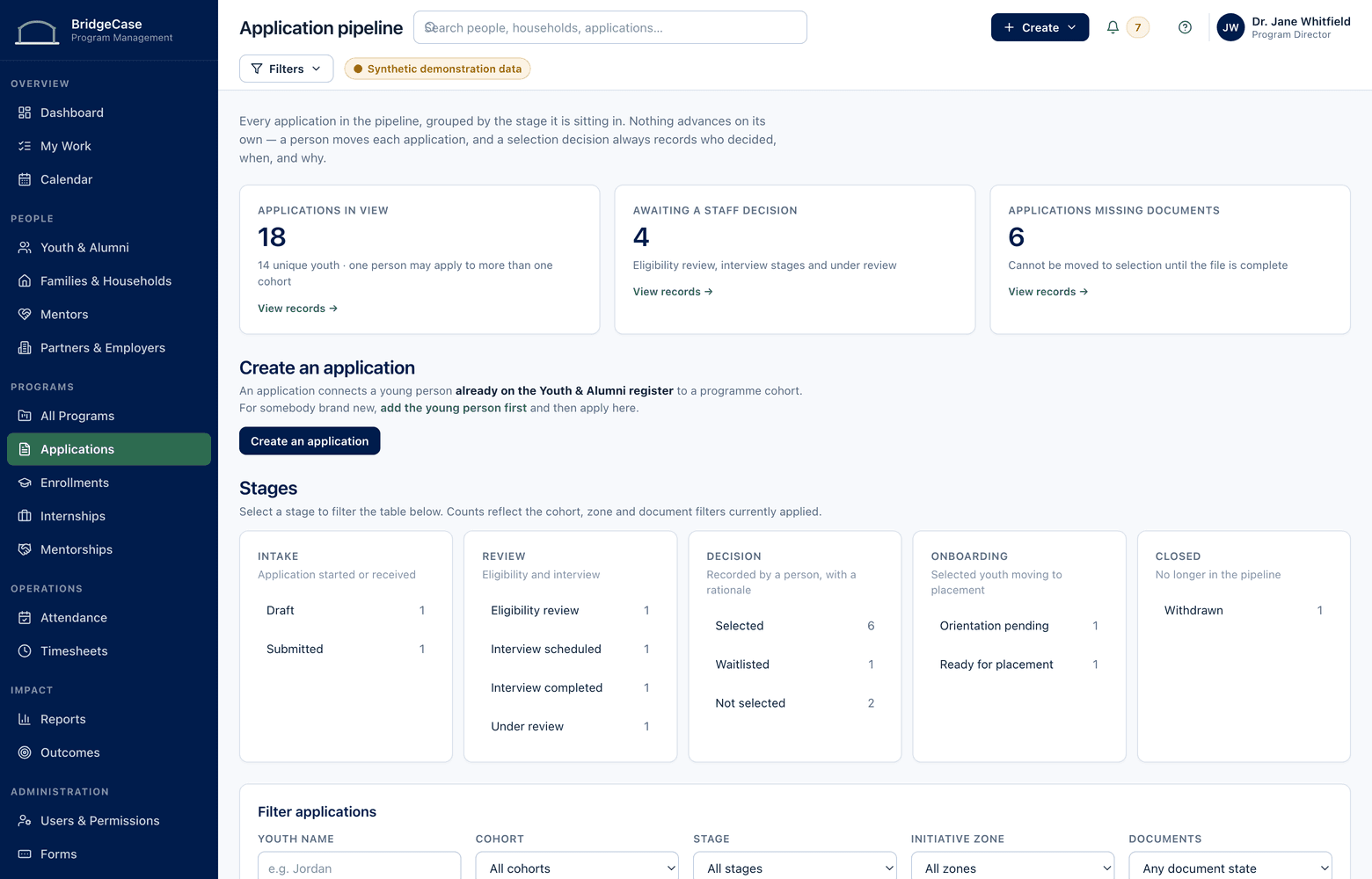
The problem
Every program year shouldn't start from zero.
Applications arrive through a standalone form tool. Interview notes live in a shared doc, decisions in a spreadsheet, attendance on paper sign-in sheets, and follow-up emails in individual inboxes. By mid-cycle, no single system can answer the basic questions: who applied, who was accepted, who actually showed up last week, and who is still waiting for a spot.
Worse, none of it accumulates. A student who completed your summer program applies to your afterschool cohort and gets treated as a stranger — same form, same questions, no history. Staff re-enter data they already have, families repeat themselves, and the record of three years of participation exists only in three disconnected exports.
Program management isn't a form problem or an attendance problem. It's a continuity problem — and continuity requires that intake, enrollment, and daily operations all write to the same record.
The workflow
Apply → Review → Interview → Select → Enroll → Attend → Follow Through
One pipeline from first application to final session, every stage on the record.
- 1
Collect applications
Publish a configurable application form per program. Known participants and households pre-fill from their existing record — new applicants create one.
- 2
Review & select
Move applicants through review stages, schedule interviews, record scores and decisions. Selection stays a staff judgment — the system keeps it organized and documented.
- 3
Enroll into cohorts
Accepted applicants become enrollments in a specific cohort with defined capacity. Everyone else lands on a managed waitlist instead of a forgotten spreadsheet tab.
- 4
Run the program
Session rosters, attendance capture, tasks, logged communications, documents, and program calendars — daily operations recorded where reporting can find them.
Capabilities
What the program management module covers.
Programs & cohorts
Define programs once, then run them in terms or cohorts with their own dates, staff, sessions, and enrollment capacity.
Configurable application forms
Program staff build and revise application forms — sections, required fields, conditional questions, document uploads — without a developer or a support ticket.
Interviews & selection
Interview scheduling, reviewer notes, scoring, and stage-by-stage pipeline views, so selection decisions are consistent and defensible.
Waitlists & capacity
Cohort capacity is enforced, waitlisted applicants are ranked and tracked, and an opened spot shows exactly who is next and how long they've waited.
Attendance capture
Mark a whole session roster in one pass — present, absent, excused — from a laptop or phone, with patterns visible per participant and per cohort.
Tasks, communications & calendars
Follow-up tasks with owners and due dates, calls and messages logged to the record, documents attached where they belong, and program calendars staff actually check.
Who it helps
Value for every role in the organization.
- Program managers
- A live pipeline view per program — applications in, decisions pending, seats filled, waitlist depth — without compiling anything from staff.
- Intake & front-line staff
- Applications that pre-fill for known families, clear next steps per applicant, and no retyping data the organization already holds.
- Executive directors
- Demand versus capacity across every program at a glance — where waitlists are growing, where seats go unfilled, and where attendance is slipping.
- Data & grants staff
- Application, enrollment, and attendance counts that trace back to source records — ready for funder reports instead of reconstructed for them.
Reporting
Enrollment and attendance numbers you can stand behind.
Because applications, decisions, and attendance are captured as they happen, program reports come from the operational record — not from a quarter-end scramble.
- Application-to-enrollment funnel by program, cohort, and period
- Enrollment against capacity and waitlist depth across programs
- Attendance rates by cohort, session, and individual participant
- Participants active in multiple programs, without double-counting
- Year-over-year re-enrollment and program completion by cohort
Program data, scoped to the people who run the program.
- Application details visible by program role — reviewers see their pipeline, not the whole database
- Interview notes and selection scores restricted to designated reviewers
- Attendance and rosters available to session staff without exposing case records
- Every view and change to an applicant record captured in audit history
Frequently asked questions
Can our staff build and change application forms without developers?
Yes. Forms are configured by program staff — add sections, set required fields, use conditional questions, collect document uploads, and publish a new version for the next cycle. No code, no vendor change request. Historical submissions keep the form version they were submitted on.
Can one participant be enrolled in several programs at once?
Yes — that's the point of the platform. One person, one household, many programs: each enrollment is its own record with its own cohort, attendance, and paperwork, but they all attach to the same participant. Reports can count each program accurately without double-counting the person.
How does attendance capture actually work day to day?
Each cohort session has a roster. Staff mark the whole group in one pass — present, absent, excused, with an optional note — from a laptop or phone at the door. Attendance rolls up instantly to the participant record, the cohort view, and reporting, so a slipping pattern is visible in days, not at end of term.
Are calls, emails, and other communications logged anywhere?
Yes. Staff log calls, messages, and meeting notes directly on the participant or household record, and tasks can be created from any of them. When a family calls back three weeks later, whoever answers sees the whole thread — visibility governed by role, like every other record.
What happens when a past participant applies to a new program year?
Their application starts from the record you already hold — identity, household, and prior participation are recognized, so the family confirms and updates rather than re-enters. Staff reviewing the application see previous enrollments, attendance, and notes their role permits, which is exactly the context selection decisions need.
See what one connected system could look like for your organization.
We will tailor the conversation to your programs, users, reporting needs, and current tools.
No youth or family data is required to request a demo.