Youth internship management software
Manage the full youth internship lifecycle in one place.
Applications, interviews, work-readiness training, employer placements, timesheets, site visits, evaluations, and follow-up — BridgeCase carries a young person from first application to post-program employment check-in, with every hour and every employer relationship on the record.
The problem
Work-based learning programs run on paper timesheets and personal relationships.
A typical youth employment program tracks applications in one form tool, employer contacts in a coordinator's inbox, placements on a whiteboard, and hours on paper timesheets that arrive crumpled, late, or not at all. Payroll processing waits on someone re-keying hours into a spreadsheet, and a single transcription error means a young person's stipend is wrong.
The employer relationships that make the program possible are just as fragile. Which worksites hosted interns last summer, which supervisors were responsive, which placements ended early and why — that history lives with whoever managed it. When they leave, the program starts rebuilding its employer network from zero.
And because the intern is often also a mentee, a program participant, or part of a family receiving services, standalone workforce tools miss the context — and force staff to enter the same young person twice.
The workflow
Apply → Interview → Train → Match → Place → Approve Hours → Evaluate → Follow Up
One pipeline from application to post-program follow-up, condensed here into four working stages.
- 1
Apply & interview
Applications with eligibility documents, interview scheduling and scoring, and a pipeline view showing exactly who is at which stage — no candidate lost in an inbox.
- 2
Train & match
Work-readiness training tracked to completion, then placement matching against employer records — openings, schedules, interests, and transportation realities. Staff make the match; the system supplies the context.
- 3
Place & approve hours
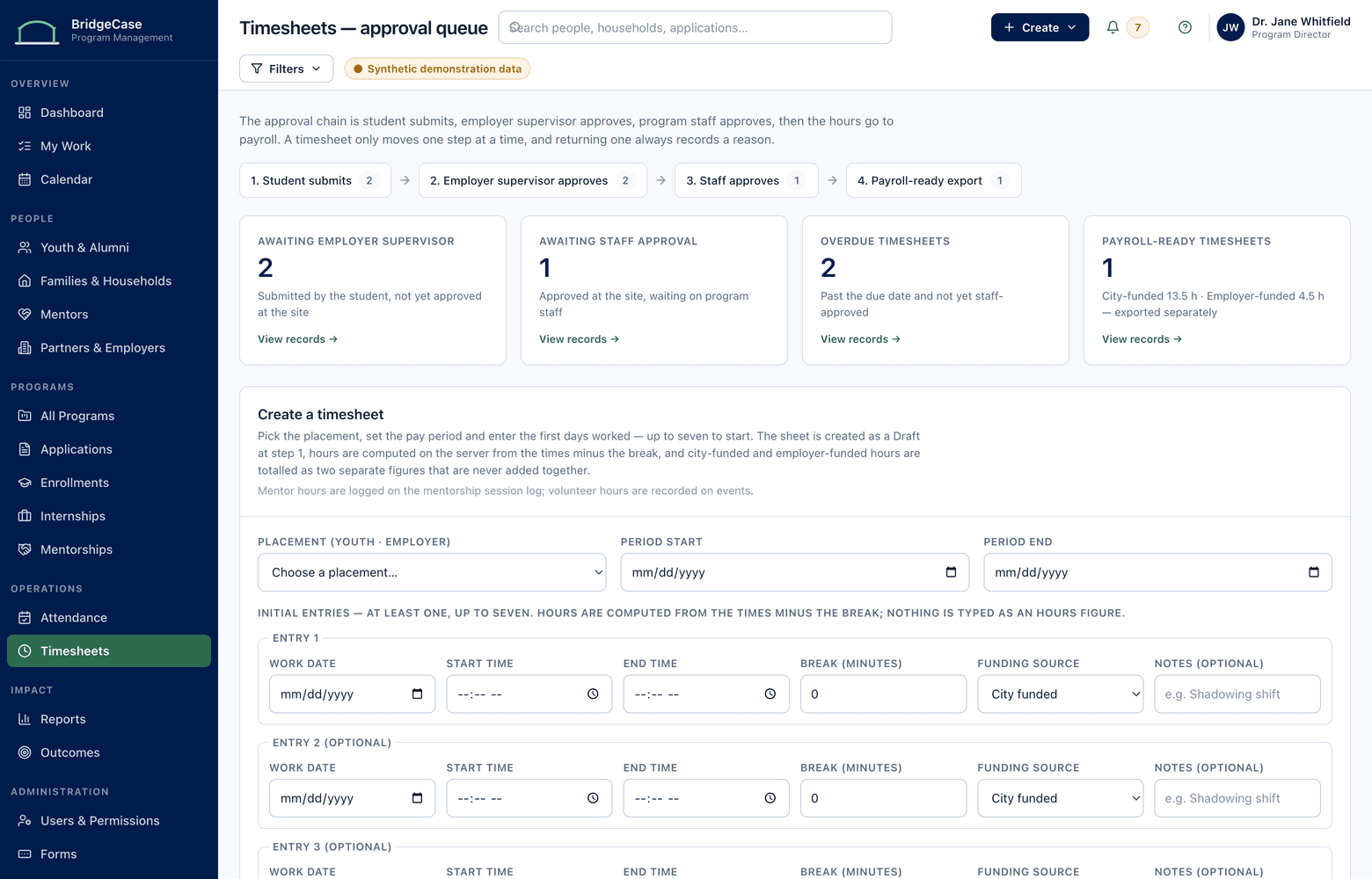
Placements with start dates, supervisors, and wage or stipend terms documented. Interns submit digital timesheets; approvals route to the worksite supervisor and program staff; approved hours export for payroll processing.
- 4
Evaluate & follow up
Site-visit logs, mid-point and final evaluations from supervisors and interns, and scheduled employment follow-ups after the program ends — all feeding the outcomes record.
Capabilities
What the workforce and internship module covers.
Employer records
Worksites, supervisors, openings, agreements, and full placement history per employer — the program's employer network becomes an institutional asset, not a personal one.
Placement management
Each placement links an intern, an employer, a supervisor, and terms — with status, schedule, and early-end reasons tracked from first day to last.
Digital timesheets
Interns submit hours from a phone; supervisors and staff approve in a routed queue; approved hours export in payroll-ready formats. No paper, no re-keying.
Site visits
Structured visit logs per worksite — date, observations, concerns, and follow-ups — so monitoring is documented, not remembered.
Evaluations
Supervisor and intern evaluations at the milestones you define, scored consistently so results compare across worksites and cohorts.
Employment follow-up
Scheduled check-ins at intervals you set after the program ends, recording employment and education status on the young person's permanent record.
Who it helps
Value for every role in the program.
- Workforce coordinators
- One queue showing pending applications, unfilled openings, missing timesheets, overdue site visits, and evaluations still outstanding.
- Program directors
- Placement counts, hours worked, completion rates, and employer capacity by cohort — visible without asking anyone to compile a spreadsheet.
- Worksite supervisors
- A limited portal role: approve timesheets and submit evaluations for their own interns, with none of the case-management system to learn.
- Finance & grants staff
- Approved hours with documented rates, exportable for payroll processing and defensible for funder monitoring — every figure traceable to a source timesheet.
Reporting
Reporting that falls out of the work.
Because applications, hours, visits, and evaluations are captured as they happen, workforce reports are generated from source records — not reconstructed at the deadline.
- Applications, placements, and completions by program, cohort, and period
- Hours submitted, approved, and exported, by placement and worksite
- Employer participation and placement capacity across the network
- Site-visit coverage and evaluation completion by worksite
- Post-program employment and education status at each follow-up interval
Built for wage data and minors.
- Wage and stipend terms visible only to roles that need them
- Worksite supervisors see their own interns — never the wider caseload or family records
- Timesheet submissions, edits, and approvals carry a full audit trail
- Youth program history stays with staff roles; employers see only their placements
Frequently asked questions
How do employers interact with BridgeCase without full system access?
Worksite supervisors get a deliberately narrow role: they see their own interns' placements, approve or return submitted timesheets, and complete evaluations. They never see case notes, family information, or other participants. Programs that prefer to keep employers out of the system entirely can have staff record approvals on their behalf.
How does the timesheet approval flow work?
An intern submits hours for a pay period. The timesheet routes to the approvers you configure — typically the worksite supervisor first, then program staff. Approvers can return a timesheet with a note for correction. Once fully approved, hours are locked, logged, and available to export; late and missing timesheets surface on the coordinator's queue.
Does BridgeCase pay stipends or wages?
No — BridgeCase is not a payroll system. It documents the terms of each placement, captures and approves the hours, and exports approved hours with rates in formats your payroll provider or finance team can process. The documentation trail from timesheet to export is what makes the figures defensible.
Can internships connect to a young person's mentoring and program history?
Yes — that's the point of a connected record. An internship placement sits on the same participant record as mentoring matches, program enrollments, and family services. A coordinator preparing a placement can see relevant history their role permits, and funder reports can show employment outcomes alongside the rest of a participant's journey.
Can it handle a large seasonal cohort, like summer youth employment?
Yes. The pipeline is built for volume spikes: batch application review, cohort-level placement tracking, and timesheet queues that show at a glance who hasn't submitted. Prior-year employer records carry forward, so each summer starts from your existing network instead of a blank list.
See what one connected system could look like for your organization.
We will tailor the conversation to your programs, users, reporting needs, and current tools.
No youth or family data is required to request a demo.