Nonprofit outcomes & grant reporting software
Build reports from the work your team already records.
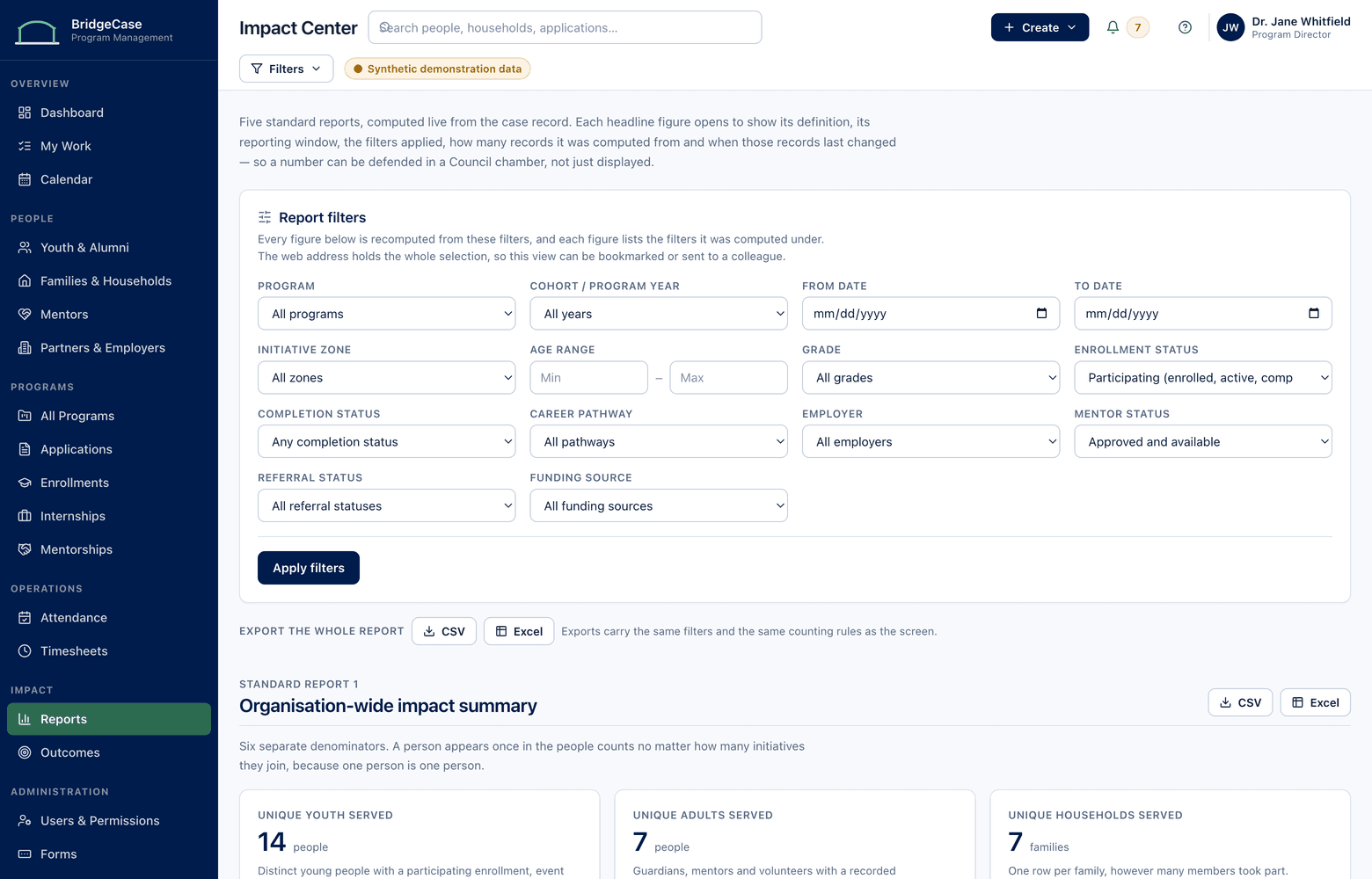
Enrollments, attendance, sessions, services, placements — your staff already record all of it as they work. BridgeCase turns those source records directly into grant reports, board packets, and council updates, with counting rules defined once so every audience sees numbers that reconcile.
The problem
Reporting season shouldn't be a reconstruction project.
In most organizations, the grant report due Friday triggers the same scramble: export three spreadsheets, chase two program leads for their tallies, and hand-assemble a number nobody can fully stand behind. The work happened — but the record of it is scattered, so the report is rebuilt from memory at the end of the period instead of generated from what was captured during it.
The deeper problem is definitional. Is a young person who attends two programs one participant or two? Is a family that received four services one household served or four services delivered? When every spreadsheet answers differently, totals get double-counted in one report and undercounted in the next — and a funder who asks "where does this number come from?" gets a shrug instead of a record trail.
BridgeCase reports are different because the data model is different: one person, one household, many programs. Every enrollment, event, session, and service points back to a single connected record, so counts are computed — not compiled — and any value in any report can be traced to the records behind it.
The workflow
Record → Define → Filter → Report → Trace
Reporting is the by-product of daily operations, not a separate job.
- 1
Record as you work
Intake, enrollments, attendance, mentoring sessions, internship hours, referrals, and services are logged in the modules where the work happens — no parallel data entry for reporting.
- 2
Define counts once
Unique people, unique households, enrollments, events attended, services delivered, and total interactions are distinct, organization-wide definitions — so a youth in three programs is never triple-counted as three people.
- 3
Filter to the ask
Scope any report to a grant period, program, site, cohort, or funding source. The same source records answer a July–June state grant and a calendar-year foundation report without re-tallying.
- 4
Report and trace
Generate the view each audience needs — detailed for program teams, de-identified for boards and councils — and drill from any figure back to the underlying records, permissions permitting.
Capabilities
What the outcomes and reporting module covers.
Unambiguous counting
Unique people, unique households, enrollments, events attended, services delivered, and total interactions are separate, clearly labeled measures — the distinction that prevents double-counting.
Grant-period filtering
Every report can be scoped to a funding period, fiscal year, program, site, or cohort. Overlapping grant calendars pull from the same records without conflicting totals.
Outcome tracking
Define the outcomes each program measures — completions, milestones, placements, goal progress — and track them per participant over time, across every program they touch.
Configurable report layouts
Build report configurations around what each funder actually asks for — their categories, their period, their level of detail — and rerun them each cycle instead of rebuilding them.
Traceability to source
Every number in a report is computed from records, not typed into a cell. Staff with the right permissions can open any figure and see exactly which enrollments, events, or services produced it.
De-identified summaries
Executive and public-facing reports show aggregates — counts, rates, trends — with no names, case notes, or identifying detail, so sharing impact never means sharing records.
Who it helps
One set of numbers, a different view for every audience.
- Program directors
- Live enrollment, attendance, and outcome views by program and site — spotted mid-period, when there's still time to act, not discovered in the year-end report.
- Executive directors & boards
- De-identified dashboards of people served, households reached, and outcomes by program — board-ready without anyone assembling a deck from exports.
- Grant & development staff
- Each funder's report scoped to its own period and definitions, rerun in minutes each cycle, with a record trail behind every figure if a funder asks.
- Mayors, councils & agency leadership
- Community-level summaries — youth engaged, families connected to services, program reach by neighborhood — in de-identified form appropriate for public settings.
- Employer & internship partners
- Placement counts, hours completed, and program milestones for the interns they host — the accountability partners expect, without access to participant records.
- Provider networks & funders
- Consistent definitions across sites and subgrantees, so a network-wide count of unique people served is a real number — not a sum of overlapping site tallies.
Reporting
Reports you can defend, line by line.
Because every count is computed from source records, these aren't estimates — they're queries. Change the filter and the same records answer a different question.
- Unique people and unique households served, by program, site, and funding period
- Enrollments, events attended, and completion rates scoped to a specific grant period
- Services delivered and total interactions across family resource and referral work
- Mentoring hours and internship placements reported alongside program outcomes
- De-identified community impact summaries for boards, councils, and public meetings
Aggregate insight without record exposure.
- Report viewers see numbers — never the case records behind them — unless their role permits it
- Drill-down from a figure to source records respects the same permissions as the records themselves
- De-identified reports carry no names, notes, or identifiers, by design rather than by redaction
- Report exports and record access are captured in audit history
Frequently asked questions
Can we configure our own reports, or are we limited to built-in ones?
Both. BridgeCase ships with standard views — people served, enrollments, attendance, services, outcomes — and lets you build configurations of your own: choose the measures, the grouping, the period, and the level of detail, then save the configuration and rerun it whenever it's due.
Our funders each want different formats and definitions. How does that work?
You set up a report configuration per funder — their reporting period, their programs, their categories, and whether they count enrollments, unique people, or services. Each cycle, you rerun the configuration against current records instead of rebuilding the report. The definitions stay consistent because the underlying records don't change per funder — only the lens does.
How does de-identification work for board and public reporting?
De-identified reports are built from aggregate queries — counts, rates, and trends — and never include names, case notes, or record-level detail. It isn't a redacted version of a detailed report; identifying data is simply never part of the output. Detailed drill-down remains available only to staff whose roles permit access to the underlying records.
What prevents the same person from being counted twice across programs?
The data model. Each person has one record, and each household has one record, no matter how many programs they're enrolled in. "Unique people served" deduplicates by person; "enrollments" counts program participation; "total interactions" counts touchpoints. Because those are three different measures with three different names, a report can't quietly conflate them.
Can we export our data for analysis outside BridgeCase?
Yes. Report results and underlying data can be exported in standard formats for spreadsheets and analysis tools, subject to the exporting user's permissions. Your data is yours — exports are a normal capability, not a negotiation, and export activity is recorded in audit history.
See what one connected system could look like for your organization.
We will tailor the conversation to your programs, users, reporting needs, and current tools.
No youth or family data is required to request a demo.