Youth participant & household management software
See the complete journey—not another disconnected record.
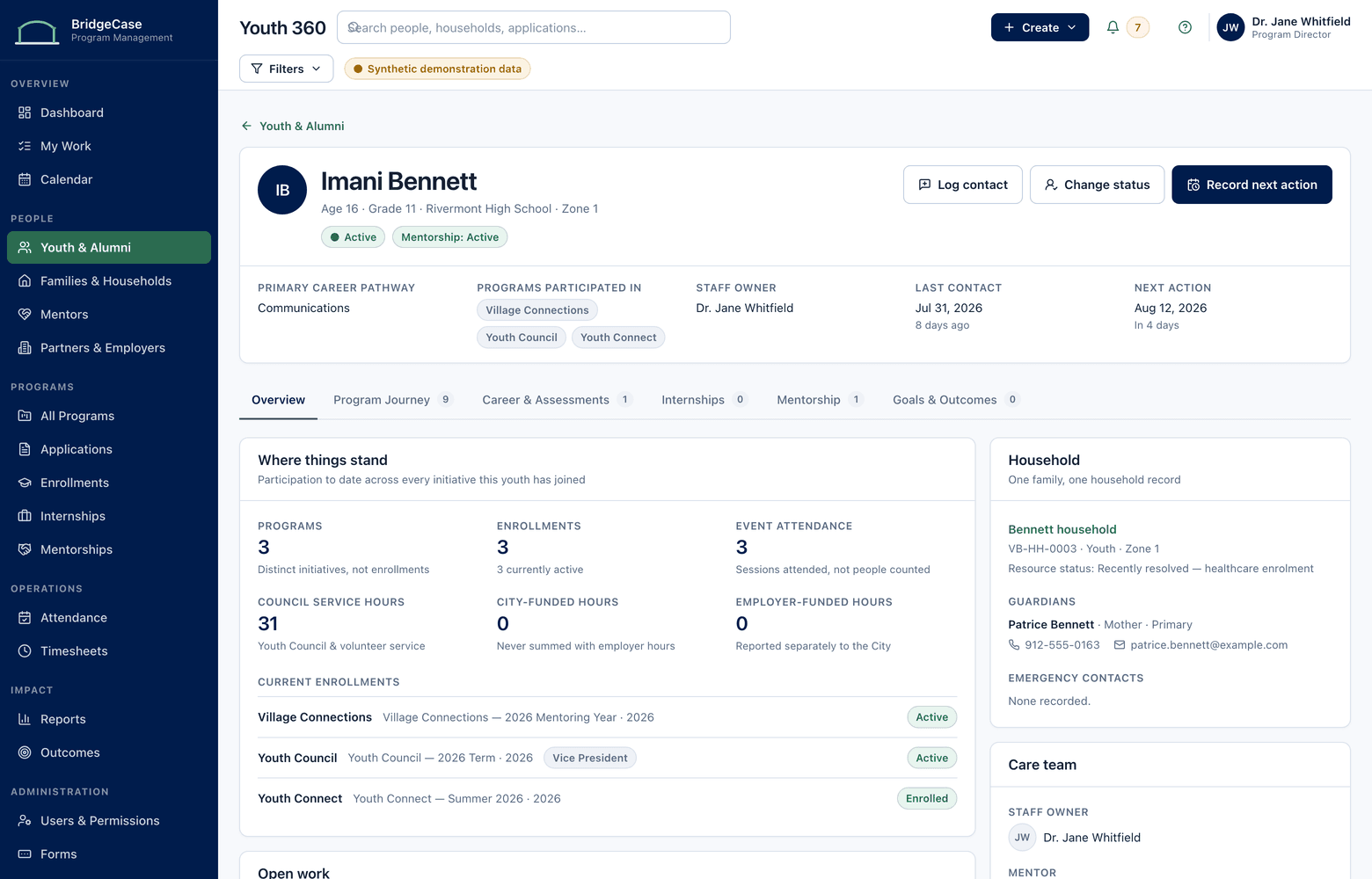
Every program a young person joins, every mentor, internship, service, referral, and outcome accumulates on one permanent profile — connected to one household record for their family. Staff change. Programs change. The record holds.
The problem
Your data doesn't have a program problem. It has an identity problem.
The same seventh grader is a row in the afterschool roster, an applicant in the summer-program form tool, a mentee in the mentoring tracker, and "sibling" in her brother's case file. Four systems, four spellings, zero connection. Nobody can answer the first question a new case manager or a funder asks: how long have we known this young person, and what has actually happened?
Household context disappears the same way. A guardian calls, and the staff member answering can't see that two siblings are enrolled in different programs, that a housing referral went out in March, or that a colleague spoke with the family last week. Generic CRMs weren't built for this — a youth services CRM has to model people and households, not accounts and deals.
Then a coordinator leaves, and the history that lived in their head and their personal spreadsheet leaves with them. A longitudinal record is how an organization remembers — through staff turnover, program redesigns, and a decade of one family's involvement.
The workflow
Create or Match → Connect the Household → Accumulate History → Follow Up After Exit
A record that starts right stays right — and gets more valuable every year it exists.
- 1
Create or match
Intake searches existing profiles by name, date of birth, and household before anything new is created. Likely duplicates are flagged for review, and staff-approved merges preserve both histories.
- 2
Connect the household
Link guardians, siblings, addresses, and contact preferences into one household record — including youth connected to guardians across separate households.
- 3
Accumulate history
Enrollments, attendance, mentor matches, internship placements, services, referrals, and outcomes append to the profile as programs run. No re-entry, no per-year copies.
- 4
Follow up after exit
Aging out changes a status — it never orphans a record. Alumni cohorts, scheduled check-ins, and long-term outcome tracking keep the story going after the last program ends.
Capabilities
What Participant & Household 360 covers.
Longitudinal participant profiles
Demographics, relationships, documents, and every program interaction from first intake to alumni check-in. Unlike youth participant management software that resets each program year, the profile is permanent.
Household records
Guardians, siblings, needs, services, referrals, and communication history connected at the family level — the record family case management software is supposed to be built around.
Duplicate prevention & merge
Match checks at intake, a review queue for likely duplicates, and side-by-side merges that keep every enrollment and note from both records — with the merge itself audited.
Cross-program timeline
One chronological view across programs, years, sites, and staff: enrollments beside mentor matches beside internships beside family services.
Data quality workspace
Missing required fields, stale contact information, and unreviewed duplicate candidates surface as work queues — so quality is maintained weekly, not repaired before reporting deadlines.
Alumni status & follow-up
Structured exits, alumni cohorts, and scheduled follow-ups — with outcomes recorded years after exit attached to the same record as the original enrollment.
Who it helps
One record, read differently by every role.
- Case managers & program staff
- Open one profile before a call or home visit and see the full context — so no family is ever asked to repeat a story your organization already knows.
- Intake & front-desk staff
- Search first, create second. The system flags likely matches at the moment of entry, so duplicates are prevented instead of cleaned up later.
- Executive directors
- Unduplicated counts of youth and families served, and retention measured across years — numbers you can stand behind in a board meeting.
- Data & evaluation staff
- Stable identifiers make longitudinal analysis possible at all: cohort comparisons, multi-year retention, and exports that don't start with a deduplication project.
Reporting
Unduplicated counts, without the weekend of deduplication.
When every interaction lands on one identified record, "how many youth did we serve" has exactly one answer — and it holds up under a funder's follow-up questions.
- Unduplicated youth and households served by program, site, and fiscal year
- Multi-year retention and re-enrollment patterns across programs
- Household-level service and referral history for family case reviews
- Data completeness and duplicate-review status by program
- Alumni outcomes tracked against original enrollment cohorts
One record doesn't mean one audience.
- Role-based permissions scope which parts of a profile each staff role can open
- Restricted program involvement — such as diversion — can be hidden from general staff entirely
- Household and custody details are visible only to roles that work with families
- Every view, edit, and merge of a profile is written to audit history
Frequently asked questions
How does BridgeCase prevent and resolve duplicate records?
Prevention happens at intake: before a profile is created, the system checks existing records by name, date of birth, and household, and flags likely matches for staff to review. When duplicates do exist — usually inherited from legacy data — staff resolve them in a side-by-side merge that keeps every enrollment, note, and document from both records. Merges are never automatic, and each one is recorded in audit history.
Can a household have multiple guardians, or a youth connected to more than one household?
Yes. Relationships are modeled per person, not per address. A young person can be linked to guardians in separate households, each guardian carries their own contact and communication preferences, and there is no forced "primary parent" field. BridgeCase records the family structure your staff enter — it doesn't presume what a family looks like — and notes about custody arrangements can be limited to the roles that need them.
What happens to a record when a young person ages out of our programs?
The status changes; the record stays. Exiting a final program moves the profile to an alumni status with its full history intact, subject to your organization's retention policy. From there you can schedule follow-ups, run alumni surveys, and record long-term outcomes on the same record. If they return years later — as a participant, a mentor, or even staff — you pick up the existing history rather than starting a new file.
We have years of overlapping spreadsheets with inconsistent names. Can that be migrated?
Yes — this is the most common starting point. Implementation includes importing your approved historical data with validation, detecting duplicate candidates across sources, and putting every proposed merge in front of your staff before go-live. Nothing is merged without your review, and the original source values are preserved.
Does one shared record mean every staff member sees everything?
No. One record is about continuity, not universal visibility. Role-based permissions control which programs, notes, and household details each role can open, restricted programs can be hidden from general staff entirely, and every access to a limited record is logged. A volunteer coordinator and a family case manager can work from the same profile and see very different things.
See what one connected system could look like for your organization.
We will tailor the conversation to your programs, users, reporting needs, and current tools.
No youth or family data is required to request a demo.